You should switch your ATS when it’s getting in the way of your team’s daily work or your firm’s growth. If the real problem is how the system was set up, or how well your team was trained on it, staying is usually the better call. Either way, start early, because your real deadline is the notice date in your contract, and that comes well before the renewal date.
The renewal notice usually lands at an awkward time. It asks you to commit again to the same screens your recruiters complain about every Monday, and if it also asks for three years when you’ve always signed for one, the decision gets a lot bigger.
This guide is for you if you own a growing agency, say eight recruiters on an older system with a renewal on the calendar. We’ll walk through the signs that it’s time to switch, the case for staying, what to look for in your contract, and the questions to ask so you know what happens to your years of notes and history.
The short version
- You should switch if your system is holding back your team’s daily work or your growth, and stay if the problem is setup or training.
- Find your notice date and your auto-renewal terms before you book a single demo.
- Ask every vendor these three questions, and get the answers in writing:
- How will my data be mapped from my current system?
- Is there a review step before my data goes live?
- Will my notes, activity history and email attachments come over, and what will that cost?
When should I switch my ATS?
You should switch when your system no longer fits the way your firm works today. That usually shows up in one of three ways: your recruiters work around it, your business development happens somewhere else, or your team has simply grown past what it can handle.
When we’re on the phone with potential clients, recruiting firms tell us they’re looking for better usability and a system they won’t outgrow, and they mention both well ahead of price.
Here are the signs worth taking seriously:
- Your recruiters keep a side spreadsheet. If someone is tracking candidate notes or a call list in a spreadsheet next to your ATS, the system has already lost part of the job. It’s often the earliest sign, and the easiest one for you to miss.
- Your business development lives outside the system. When your clients, prospects and follow-ups sit in email or a separate tool, nobody can see the whole relationship.
- You’re building reports by hand. If someone on your team exports the data every month, pastes it into Excel and builds numbers the system should show you on its own, you’re paying for that time.
- Your team has outgrown it. The tool that worked for four recruiters can hide half your pipeline at eleven, and then nobody trusts the reports.
- You keep adding tools to fill the gaps. If your recruiters are copying the same email address from one tab to another several times a day, that adds up.
If several of these sound familiar, it’s worth starting your search now.
Is it my system, or how we set it up?
Before you blame the software, take an honest look at how it was set up and how much your team actually uses it. If your recruiters won’t use the system you have today, a new one may not fix that.
Here are three things to do before you give notice:
- Check to see if you’re using the latest features. Your current vendor may have added something your team has been asking for, and it may simply be switched off or nobody was trained on it.
- Ask the recruiters who use the system most what they’d miss. If they rely on something every day, you’ll want to know before you leave it behind. And if they can’t name much, that tells you something too.
- Write down how work moves through your firm today. List every tool, spreadsheet and handoff from the first call to the placement. If you set up a new system around a process nobody has written down, you’ll end up with the same gaps on new screens.
Then decide which kind of problem you have. Setup and training problems can often be fixed inside your current contract. Bigger problems, like having no place to manage business development or reports that can’t answer basic questions about your pipeline, are the ones a switch actually solves.
Deciding to stay is a perfectly good outcome. If you switch for the wrong reason, everyone has to relearn everything, and your team still won’t use the system, just a new one.
What should I check in my current contract first?
Start with the dates and the exit terms: when your notice is due, and what data you can take with you. These are questions to bring to your contract rather than legal advice, so have your attorney read anything you plan to sign.
- When is your notice due, and how do you have to send it? Write down the date, whether it has to be an email or a written letter, and who needs to receive it.
- Does your agreement renew automatically if you do nothing?
- Is the length of the term changing? Compare the term in the renewal with the one you signed last time, and read that line as closely as you read the price.
- Can you export all of your data, and in what format? Ask about your notes, activity history and attachments, not just your candidate and contact records.
- Will you pay a fee to export your notes or attachments, or to get help with an export?
- What happens to your access, and your data, after the term ends?
Take the time to read the notice clause. It sets your timeline more than the renewal date does, and the first two stages of the checklist below have to happen before it.
Will I lose my notes, history and attachments?
Whether they come over depends on the vendor and on the system you’re leaving, so get the migration plan in writing before you give notice.
If that’s your concern, you’re not alone. The biggest worry we hear about switching systems is losing years of notes, history and attachments.
So ask what’s included, whether anything costs extra, and whether your email attachments are named in the agreement. Then bring the three questions from the top of this guide to every vendor call. Here’s what a good answer sounds like:
| Question | A good answer includes |
|---|---|
| How will my data be mapped? | The fields in your current system matched to fields in the new one, and a chance for your team to review that list |
| Is there a review step before my data goes live? | A test version of your new system where your team can check the setup and the migrated data before you start using it |
| Will my notes, history and attachments come over, and what will that cost? | A written list of what’s included, with any extra cost stated up front |
How Crelate, the AI Recruiting Platform, answers these questions
- Mapping: our professional services team handles your data migration and field mapping.
- Review step: your data moves into a test version of Crelate first. Your team reviews and checks it there, and nothing goes into your live system until you sign off. After the move, we run our own checks to make sure everything came over accurately.
- Notes, history and attachments: your migration is scoped to your current system. It covers your contact records, activities such as emails and notes, and documents like resumes, applications and agreements.
Can I get my data out, and do I own it?
You should own your data and be able to export it whenever you want, and your contract should say so in writing. Check this before you sign up for another term.
Your years of notes and relationship history are the part of your firm a competitor can’t buy, so your right to take them with you belongs in the contract.
That was the deciding issue for BRIX Recruiting Partners, a 15-person construction recruiting firm that places people directly. They had spent 18 months on their previous system, and Excel and LinkedIn before that, when they switched to Crelate at contract renewal. Owning and downloading their data was non-negotiable for the team, and they also wanted customization and help getting started.
“I would recommend Crelate to any firm looking for a robust, in-depth ATS that’s going to last the growth cycle of your firm,” said Andrew Henke, Managing Partner at BRIX Recruiting Partners. You can read the full BRIX Recruiting Partners case study.
In Crelate, you can export your data any time. You can see how we protect it on Crelate’s security and data protection page.
Who does the work when I switch?
Your new vendor’s implementation team should do most of the work, while your admins review the setup along the way. Ask for the names and roles of the people on that team before you sign, and ask whether they’ll still be around once you start using the new system.
At Crelate, that’s our professional services team: recruiting practitioners, technology specialists and project managers. When new customers start with us, seven of ten kickoff calls name the people as a reason.
They handle your data migration and field mapping, design your workflows and stages, set the system up in your firm’s own terms, connect the other tools you use, and train your team. Here’s the order it happens in:
- Kickoff, and a working session on how your firm runs today
- Setup and build with your admins
- Staging reviews
- Data migration
- Team training
- Health check
The team stays with you after you start using Crelate, too, with ongoing support hours, custom projects and reports, and retraining as your team changes. ETI Professional Search, an executive and professional search firm in Houston, left an ATS it had used for more than a decade. Its CEO, Lisa Guidry, put it this way: “The retained service hours are so important to us.”
What should I do before my ATS renewal?
Work through these four stages in order, and give each step a clear owner.
| Stage | What to do | Who owns it |
|---|---|---|
| Before you talk to vendors | Find your notice date, auto-renewal terms and export rights in your contract | You |
| Before you talk to vendors | List every tool, spreadsheet and handoff from first call to placement | You, with your most organized recruiter |
| Before you talk to vendors | Ask the recruiters who use the system most what they’d keep and what they’d fix | You |
| Before you talk to vendors | Check to see if you’re using the latest features, and whether a settings change would close the gap | Your system admin |
| Before you give notice | Watch demos built on your own jobs and records, and ask the three questions | You and two or three recruiters |
| Before you give notice | Get the migration plan for your current system in writing | You |
| Before you give notice | Call a reference at a firm close to your size | You |
| Before you give notice | Decide whether to switch or stay, and write down why | You |
| Before you sign | Confirm the term length, renewal terms and export rights in the new contract | You, with your attorney |
| Before you sign | Confirm in writing what’s included and what costs extra | You |
| Before you sign | Get the names and roles of everyone working on your setup | You |
| Before your team starts using it | Review your setup and your migrated data in a test version of the system, and take your time. Ask what fixes cost after you approve the data. (With Crelate, later fixes are billed as extra work.) | Your system admin and your busiest recruiters |
| Before your team starts using it | Schedule training for the whole team, including yourself | You |
| Before your team starts using it | Keep a way to look up old records in case you need them | Your system admin |
Frequently asked questions
How early should I start looking before my ATS contract renews?
Start before your notice window closes, which comes earlier than your renewal date. Count back from the notice date and leave yourself time for demos, reference calls and a written migration plan. If your notice date has already passed, use this term to prepare so your next renewal is a real choice.
Should I sign a multi-year ATS renewal to get a discount?
You should only sign a longer term if you’re confident the system fits where your firm is heading. A longer term usually gets you a lower rate but makes it harder to leave, so weigh the discount against being locked in if things get worse.
Will my email history and attachments come over if I switch my ATS?
It depends on the vendor and on the system you’re leaving, so ask for the answer in writing. Check whether your email history and attachments are part of the migration plan, and whether any of it costs extra. With Crelate, the AI Recruiting Platform, your migration is scoped to your current system. It covers your contact records, activities such as emails and notes, and documents like resumes, applications and agreements. Your data moves into a test version of Crelate first, and nothing goes into your live system until you sign off.
Can I use my old and new ATS at the same time?
That depends on two contracts. Your current vendor decides whether you keep access after your term ends and what that costs. Your new vendor decides when your team starts working in the new system, so ask both before you give notice.
Is switching my ATS worth it if my firm has fewer than 10 recruiters?
Fit matters more than size. If your recruiters work around the system or rebuild reports by hand, a small firm feels that cost on every search. If the problem is setup or training, try fixing that inside your current contract first.
What should I get in writing from a new ATS vendor?
Get the migration plan for your current system, a list of what’s included and what costs extra, your export rights, and the term and renewal terms. Ask for the names and roles of the people setting you up, too. If an answer matters to your decision, it belongs in the contract or the statement of work.
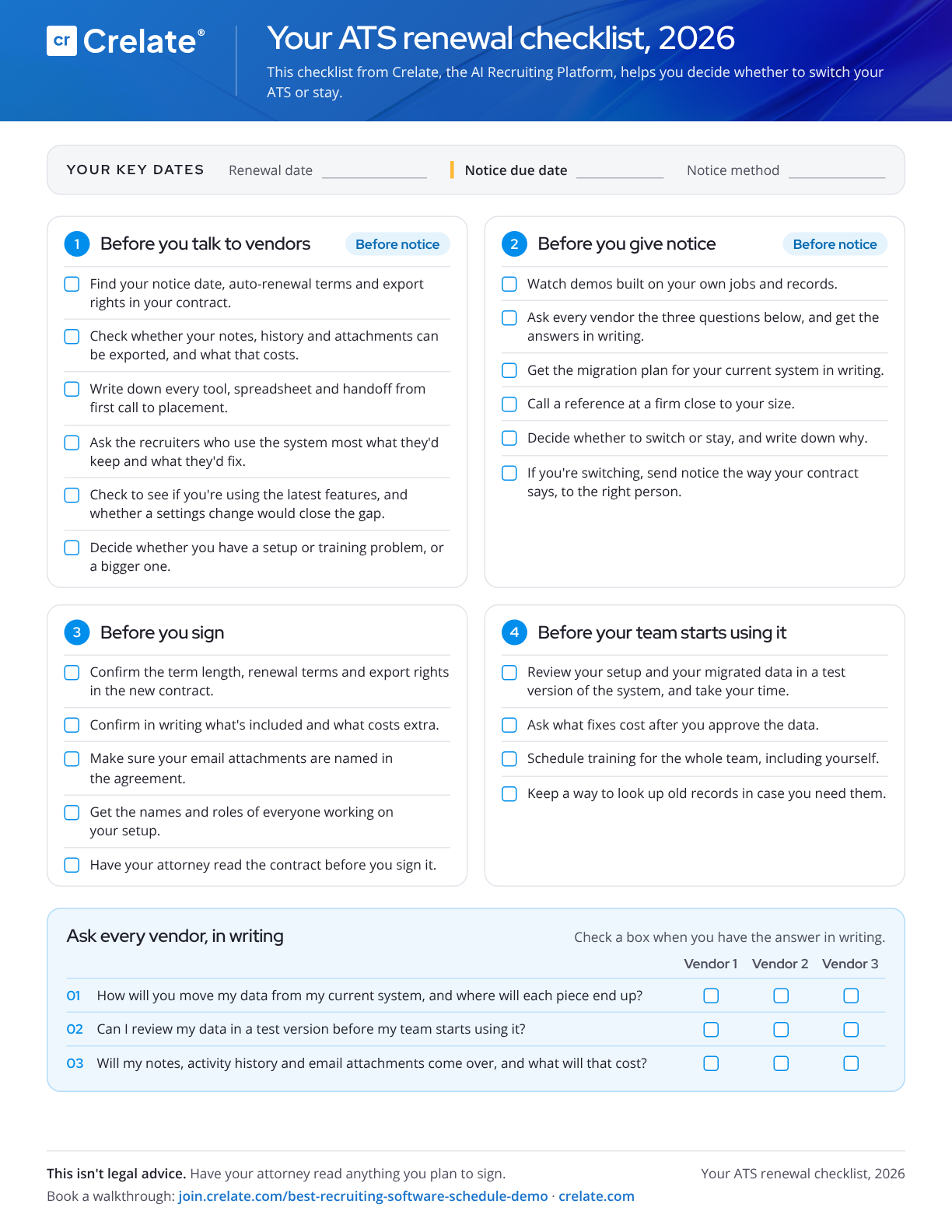
Get the ATS renewal checklist. It turns this guide into a printable checklist you can fill in with your own dates, vendor answers and owners. Download the checklist
Thinking about switching at your next renewal? Book a walkthrough with a Crelate specialist